




24 Jul 2026


Software switches aren't exactly popular on a FortiGate, but sometimes they're necessary. One issue is that the traffic can't be routed to the Network Processing Unit (NPU). This means the CPU has to take over that task, which is inefficient and can lead to performance problems.
It would be great if traffic in a software switch could be sent to the NPU instead, taking advantage of one of FortiGate's biggest strengths: offloading. That's exactly what this article looks at.
- FortiGate 70G on 7.6.7
- FortiSwitch 424E on 7.6.6
- FortiAP 241K on 7.6.5
- Windows 11 client
- Android Smartphone
An SSW-VLAN was created (SSW stands for "Software SWitch" in this post), along with a tunnel SSW-SSID, both part of the software switch LAB-SSW.
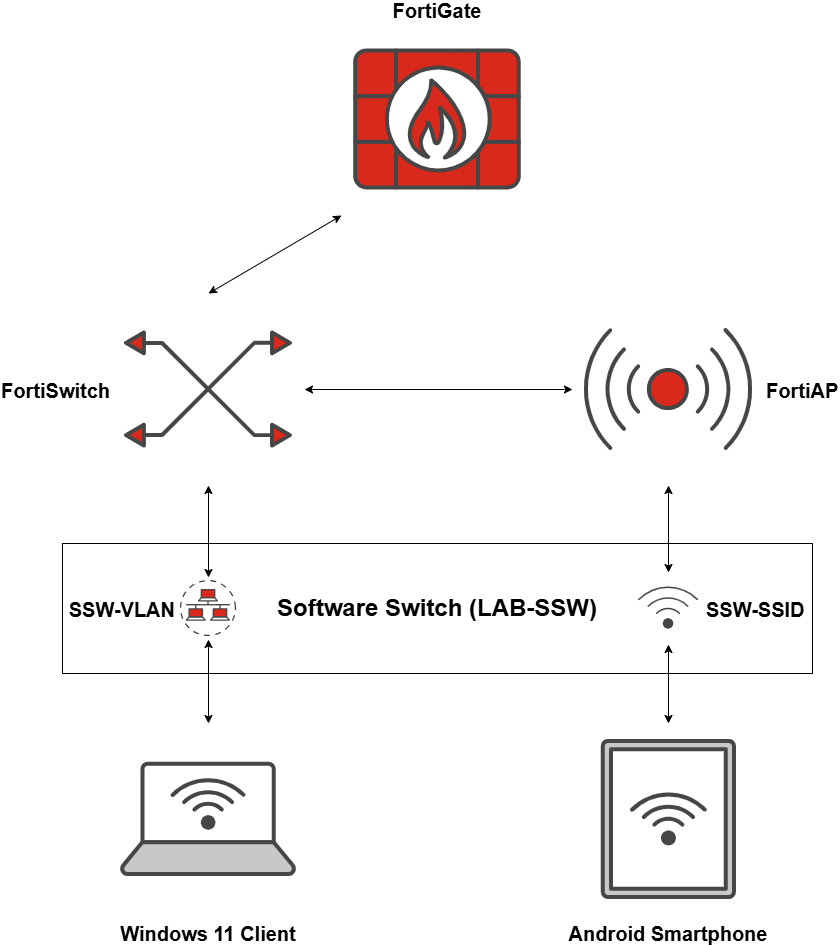
The Software Switch
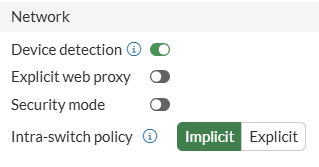
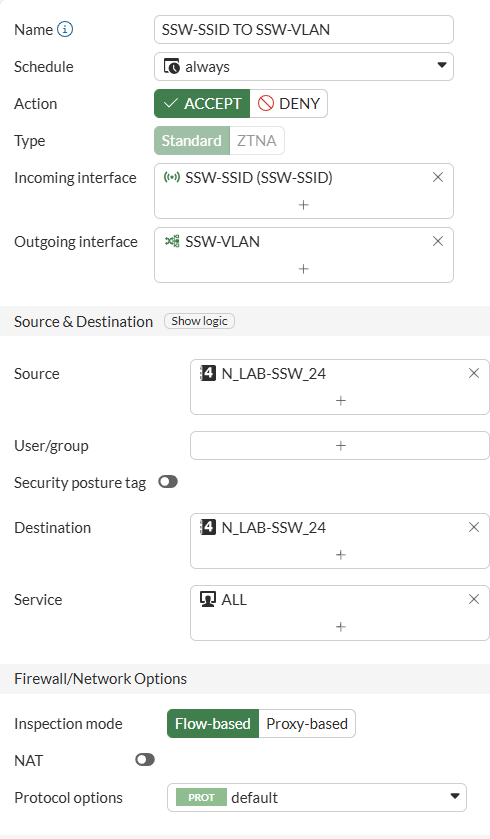
How do we get offloading to work?

session info: proto=6 proto_state=05 duration=1 expire=0 timeout=3600 refresh_dir=both flags=00000000 socktype=0 sockport=0 av_idx=0 use=3
origin-shaper=
reply-shaper=
per_ip_shaper=
class_id=0 ha_id=0 policy_dir=0 tunnel=/ vlan_cos=0/0
state=log may_dirty br npu f00
statistic(bytes/packets/allow_err): org=3207/12/1 reply=2415/9/1 tuples=2
tx speed(Bps/kbps): 2853/22 rx speed(Bps/kbps): 2148/17
orgin->sink: org pre->post, reply pre->post dev=37->38/38->37 gwy=0.0.0.0/0.0.0.0
hook=pre dir=org act=noop 192.168.101.20:60844->192.168.101.22:443(0.0.0.0:0)
hook=post dir=reply act=noop 192.168.101.22:443->192.168.101.20:60844(0.0.0.0:0)
pos/(before,after) 0/(0,0), 0/(0,0)
misc=0 policy_id=10 pol_uuid_idx=695 auth_info=0 chk_client_info=0 vd=0
serial=000042af tos=ff/ff app_list=0 app=0 url_cat=0
rpdb_link_id=00000000 ngfwid=n/a
npu_state=0x000c00 ofld-O ofld-R
npu info: flag=0x00/0x00, offload=0/0, ips_offload=0/0, epid=16/23, ipid=23/16, vlan=0x0000/0x0078
vlifid=23/16, vtag_in=0x0000/0x0078 in_npu=1/1, out_npu=1/1, fwd_en=0/0, qid=2/5, ha_divert=0/0
no_ofld_reason:
hrx info: valid=0/0, qid=0/0, npuid=0/0, sublink=0/0
session info: proto=6 proto_state=05 duration=1 expire=0 timeout=3600 refresh_dir=both flags=00000000 socktype=0 sockport=0 av_idx=0 use=3
origin-shaper=
reply-shaper=
per_ip_shaper=
class_id=0 ha_id=0 policy_dir=0 tunnel=/ vlan_cos=0/0
state=log may_dirty br npu f00
statistic(bytes/packets/allow_err): org=2366/9/1 reply=1730/6/1 tuples=2
tx speed(Bps/kbps): 2053/16 rx speed(Bps/kbps): 1501/12
orgin->sink: org pre->post, reply pre->post dev=37->38/38->37 gwy=0.0.0.0/0.0.0.0
hook=pre dir=org act=noop 192.168.101.20:60842->192.168.101.22:443(0.0.0.0:0)
hook=post dir=reply act=noop 192.168.101.22:443->192.168.101.20:60842(0.0.0.0:0)
pos/(before,after) 0/(0,0), 0/(0,0)
misc=0 policy_id=10 pol_uuid_idx=695 auth_info=0 chk_client_info=0 vd=0
serial=000042ae tos=ff/ff app_list=0 app=0 url_cat=0
rpdb_link_id=00000000 ngfwid=n/a
npu_state=0x000c00 ofld-O ofld-R
npu info: flag=0x00/0x00, offload=0/0, ips_offload=0/0, epid=16/23, ipid=23/16, vlan=0x0000/0x0078
vlifid=23/16, vtag_in=0x0000/0x0078 in_npu=1/1, out_npu=1/1, fwd_en=0/0, qid=7/4, ha_divert=0/0
no_ofld_reason:
hrx info: valid=0/0, qid=0/0, npuid=0/0, sublink=0/0

When traffic leaves the software switch

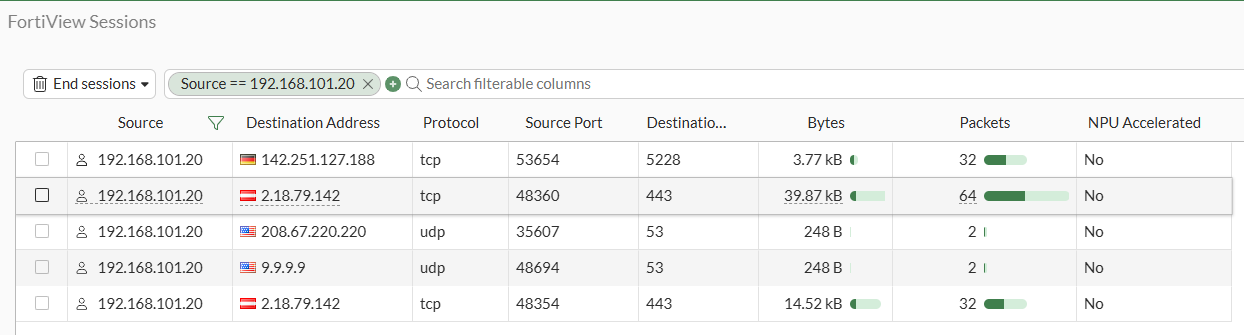
session info: proto=6 proto_state=01 duration=3552 expire=3434 timeout=3600 refresh_dir=both flags=00000000 socktype=0 sockport=0 av_idx=0 use=3
origin-shaper=
reply-shaper=
per_ip_shaper=
class_id=0 ha_id=0 policy_dir=0 tunnel=/ vlan_cos=0/255
state=log may_dirty f00
statistic(bytes/packets/allow_err): org=1966/16/1 reply=1802/16/1 tuples=2
tx speed(Bps/kbps): 0/0 rx speed(Bps/kbps): 0/0
orgin->sink: org pre->post, reply pre->post dev=39->3/3->39 gwy=192.168.1.1/0.0.0.0
hook=post dir=org act=snat 192.168.101.20:53654->142.251.127.188:5228(192.168.1.202:53654)
hook=pre dir=reply act=dnat 142.251.127.188:5228->192.168.1.202:53654(192.168.101.20:53654)
pos/(before,after) 0/(0,0), 0/(0,0)
misc=0 policy_id=14 pol_uuid_idx=697 auth_info=0 chk_client_info=0 vd=0
serial=000036d0 tos=ff/ff app_list=0 app=0 url_cat=0
rpdb_link_id=80000000 ngfwid=n/a
npu_state=0x040108
no_ofld_reason: non-npu-intf
hrx info: valid=0/0, qid=0/0, npuid=0/0, sublink=0/0
The reason is no_ofld_reason: non-npu-intf, which unfortunately can't be resolved, since the CPU is fully involved in this type of traffic.
Wrapping Up
Latest blogs
View all BlogsFeatured
Blogs
Beyond Refurbished: Why Trust Is Becoming the Real Value Driver
Featured
Blogs
FortiNAC as RADIUS server for wired/wireless 802.1X/MAC auth
Featured
Blogs
Building AI Security That Actually Works: A Technical Deep Dive into F5 AI Guardrails and AI Red Team
Featured
Blogs
The AI Adoption Paradox: Why Your Biggest Opportunity Is Also Your Biggest Risk
Featured
Blogs
Falcon Adversary OverWatch: Stop hidden threats with 24/7 expert threat hunting
Featured
Blogs

